
Game review
Screen Cat
7 / 10
- Developer
- Vorh Games
- Publisher
- Vorh Games
- Released
- 6 January 2025
- Platforms
- Windows
- Genre
- Casual, Indie, Simulation
- Players
- Single-player
The short version
Biggest strengths
- A genuinely charming, well-animated desktop companion that reviewers describe forming real, lasting emotional attachment to, in at least one case explicitly tied to grief and remembrance
- An actively, frequently updated feature set well beyond a static screen ornament, including a poop-cleaning mechanic, cat adventures that return with small narrative vignettes, and Steam Workshop customization support
- Extremely low asking price that every reviewer, positive or critical, agrees represents fair value for what's offered
Biggest weaknesses
- Reported window-management bugs, including the application seizing screen focus over alt-tab and, for at least one reviewer, failing to relaunch properly after being moved to a second monitor
- A specific, reproducible bug where the cat's bed can be dragged off-screen and become permanently unrecoverable, with no clear in-game fix
- Frequent on-screen chat bubbles and "Zzz" sleep text that at least one reviewer specifically wants an option to disable, citing an unnecessary system load
7 / 10
A small cat, living on your screen
Screen Cat is exactly what its name promises: a small, animated virtual cat that lives on your desktop, wandering the screen, napping, hunting your cursor, and needing occasional food, pets, and sleep. At a price of well under two New Zealand dollars, it's about as low-stakes a purchase as this lane covers, and based on the available English-language review sample of 200 reviews — 192 positive, 8 negative, landing at an overall Very Positive rating — it's also one of the more consistently, quietly beloved small releases this lane has encountered. "This is not a game. It's not an idle game. It's just a cat... who hangs out on your monitor. It naps. It hangs out with you. It needs munchies. It needs pets," one reviewer writes, capturing precisely how little pretense the app carries about being anything more ambitious than exactly what it is.
What elevates Screen Cat above a purely disposable novelty, according to the review sample, is a genuine, active development history layering real content onto that simple premise. "The Cat even poops now with the newest update! It's a really cozy and lovely application and the dev is very active and constantly updates the program. I love my digital cat," one reviewer writes, and a separate reviewer specifically credits the depth options available: "you have various choices of cats to choose from but you can also pet it, feed it and make it go to sleep. You can buy hats, beds and toys for the cat by gaining 'stars.' Stars are gained by cleaning the poop, removing the scratches the cat made and overall keeping it happy."
More than a screensaver: adventures, stories, and real attachment
A specific mechanic draws consistent, warm praise across the sample: periodically, the cat leaves the screen entirely on a short "adventure" and returns bearing a small narrative vignette. "This game has cute little stories when your cat runs off the screen to find something. I love these stories because they always have a moral or something that teaches you. And the cat purrs," one reviewer writes, describing a level of narrative ambition well beyond what the premise strictly requires. A separate reviewer clarifies the mechanic for anyone confused by a cat's temporary disappearance: "For the reviews that complain about cat leaving screen and never coming back, this is a feature. Cat will go on adventure for like 30 minutes then come back with an item, you can know they're on adventure by checking the bed."
That combination of personality, small narrative touches, and genuine visual charm has produced some remarkably deep, sustained attachment among reviewers, in ways that go well beyond typical desktop-widget engagement. "I usually uninstall a game/desktop-companion as soon as I got all the achievements. But not this one. The kitty is extremely adorable with its meows, walking animation, smol size, and variety of colors/breeds," one reviewer writes, describing having specifically chosen and named a cat after a favourite fictional character. A separate reviewer marks a personal, ongoing milestone: "he has been alive for 100 days today, everyone say happy birthday to meower." Most strikingly, one review frames the app in explicitly emotional, memorial terms: "A small part of my dear friend still lives on in this small pixilated cat. It's been a year... I wonder when will I be able to let go?" That's a genuinely unusual, moving use case for a two-dollar novelty app, and it speaks to real, thoughtful craft in how the cat's presence and personality come across, well beyond what its modest scope might suggest.
Window management problems, and a bed you can lose forever
Set against that warmth, the negative and mixed reviews concentrate on specific, concrete technical friction rather than complaints about the concept itself. "A good idea that requires some improvement. The only problem for me is that the game takes up the entire screen, not allowing you to interact with other objects except itself, and even if you press alt+tab, the game will pop up on top of all windows again," one reviewer writes, describing a real, workflow-disrupting bug for an app whose entire appeal depends on coexisting quietly alongside other desktop activity rather than competing for attention. A separate reviewer reports a more specific, more severe version of a related problem: "After the first time I downloaded and opened the game, I set up the game screen as Window Mode by pressing alt+Enter. Then I moved the game screen to my second monitor so I can do multi-tasking. The problem is, when I want to open the game the next time, it can't be opened. Even though I uninstalled and reinstalled the game again, the problem still exists."
A separate, specific bug concerns a piece of furniture rather than the window manager: "Love this game but I pulled the cat's bed out of screen and now I lost it. I can send the cat out sleep and then the cat sleeps outside my screen. Is there any way to bring the bed back?" That's a concrete, reproducible loss-of-item problem with no apparent in-game recovery option based on this reviewer's account, a real quality-of-life gap for an app built around small, ownable objects. A separate reviewer requests a specific accessibility toggle: "Please add an option to disable Zzz text and cat talk. Because of his messages it is felt increased load on the system at such times" — a request that, if accurate, points to a genuine performance concern rather than a purely cosmetic preference.
The achievement data offers a useful, corroborating picture of engagement depth for such a small app. Across 10 total achievements, basic care actions like giving sleep and food sit at 96.8% and 78.7% completion, while the adventure system and deeper collection-based goals fall to 54.9% and, at the bottom, just 5.1% for full collection completion. That's a genuinely wide spread for an app this modest in scope, suggesting real structural depth beneath the simple surface-level care loop for players willing to engage with its optional systems.
Where this leaves it
Screen Cat succeeds remarkably well at a genuinely difficult task: making an extremely cheap, extremely simple desktop companion app feel like a real, cared-for piece of software rather than a disposable novelty. Active development, small narrative touches through its adventure system, and a surprising degree of genuine emotional attachment from its userbase all speak to real craft well beyond the app's tiny price point. Its main problems are concrete, specific technical issues — window-focus conflicts, a lost-item bug affecting the cat's bed, and at least one report of the app failing to relaunch after being moved between monitors — rather than anything wrong with the underlying concept. Easy to recommend at its price for anyone who wants a small, low-maintenance piece of digital company on their desktop; just be aware of the reported window-management quirks before making it a permanent fixture of a multi-monitor workflow.
Pros and cons
Pros
- A genuinely charming, well-animated desktop companion that reviewers describe forming real, lasting emotional attachment to, in at least one case explicitly tied to grief and remembrance
- An actively, frequently updated feature set well beyond a static screen ornament, including a poop-cleaning mechanic, cat adventures that return with small narrative vignettes, and Steam Workshop customization support
- Extremely low asking price that every reviewer, positive or critical, agrees represents fair value for what's offered
- A star-currency system for unlocking hats, beds, and toys that gives the simple core loop a light sense of purpose and progression
Cons
- Reported window-management bugs, including the application seizing screen focus over alt-tab and, for at least one reviewer, failing to relaunch properly after being moved to a second monitor
- A specific, reproducible bug where the cat's bed can be dragged off-screen and become permanently unrecoverable, with no clear in-game fix
- Frequent on-screen chat bubbles and "Zzz" sleep text that at least one reviewer specifically wants an option to disable, citing an unnecessary system load
- At least one reviewer flags real optimization problems and describes overall content as thin relative to other desktop-companion competitors, even while still recommending it
Screenshots
-

Screen CatImage: Vorh Games via Steam -

Screen CatImage: Vorh Games via Steam -

Screen CatImage: Vorh Games via Steam -
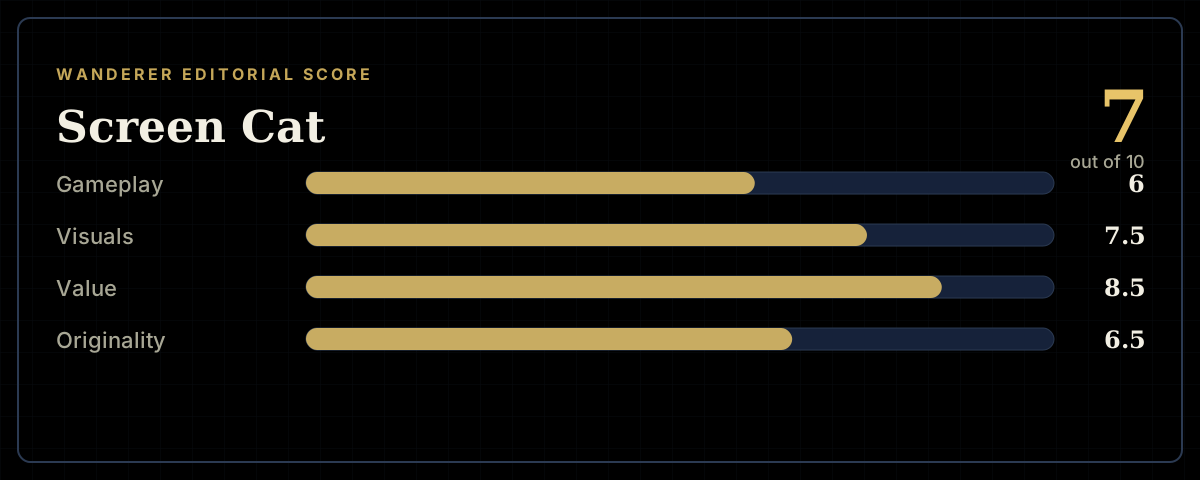
How the review scores each part of the gameWanderer Editorial -
The short versionWanderer Editorial