
Game review
Desktop Clicker
6.3 / 10
- Developer
- Desktop Labs
- Publisher
- Desktop Labs
- Released
- 16 June 2025
- Platforms
- Windows
- Genre
- RPG
Three Reviews, Split Between Genuine Fondness and a Sore-Fingers Complaint
Desktop Clicker launched on Steam on 16 June 2025 from developer Desktop Labs, and at the time of writing it has three user reviews — two positive, one negative. The negative review, from a player with 35 minutes logged, is blunt: "extremely repetitive and my fingers hurt," concluding "its cool but i don't recommend it unless you are okay with repetitive games." The two positive reviews come from players with far longer sessions logged — one with 2,102 minutes (over 35 hours) simply states "its fun," while a second with 502 minutes (over 8 hours) gives an unusually specific two-word verdict: "hard to scroll," voted as a recommendation despite the complaint embedded in it. Taken together, these three reviews sketch a consistent shape: a genuinely playable, sticky idle loop for players willing to tolerate its repetitive core and some rough interface edges, but a real turn-off for anyone allergic to either.
The Pitch Made Literal: A Combat Window That Floats Directly Over the Desktop
Desktop Clicker's core hook isn't really about combat depth — it's about where that combat happens. The game runs as a small, floating window sitting directly on top of the desktop, letting the player click through more than 90 pixel-art monsters while working, browsing, or gaming in whatever's behind it, rather than requiring a dedicated, full-screen session the way most idle games do. A screenshot confirms this isn't just a marketing claim: a tiny combat window, showing a purple slime boss at 10 of 21 health alongside a Level 3 experience bar and a gold counter, sits directly over a stock Windows desktop wallpaper, exactly as described. Damage comes from two separate sources — manual click damage for players who want to actively tap, and idle damage that ticks over passively for players who'd rather let the numbers climb on their own — with EXP, gold, and a separate diamond currency all accumulating as monsters fall. A screenshot of the Upgrades panel shows this isn't a single-stat grind either: alongside the base Click Damage (7) and Idle Damage (6) lines sit individual per-monster damage upgrades and paid unlocks for new creatures, with a "Shift + Click to buy max" shortcut built in to spare players from repetitive single-purchase clicking through the numbers.
An Eight-Category Prestige System, With a Catch: Resetting Is Mandatory to Apply It
Above the core loop sits a prestige system that the store page calls "deep," and a screenshot of the Prestige panel backs that framing up with real structure: eight separate permanent-upgrade categories — Click Damage, Idle Damage, Idle Speed, Gold Prices, Gold Reward, Experience Reward, Prestige Reward, and Enemies Health — each individually priced in the game's diamond currency, rather than a single flat "prestige multiplier" line some genre-mates settle for. That's a genuinely broader spread of permanent investment options than the bare-bones prestige systems common at this price point. The same screenshot reveals a specific mechanical catch worth flagging plainly, though: on-screen text states outright that the player must "reset all current progress to apply new prestige upgrades," meaning prestige purchases aren't simply banked and left passively active — the player has to commit to a fresh run before newly-bought upgrades actually take effect, a more deliberate, opt-in structure than prestige systems that apply instantly.
Nine-Point Window Placement and a "Hard to Scroll" Complaint That Tracks With the Design
A screenshot of the in-game Menu shows just how much thought went into making the floating-window concept actually livable: a nine-point anchor grid lets the player pin the window to any corner, edge, or the centre of the screen, alongside toggles for Always On Top and a visible Background, plus sliders for window Size, Sound, and Music. That's a genuinely more considered customization set than a simple "always on top" checkbox would suggest, and it's clearly aimed at letting the window coexist with whatever else the player is doing rather than fighting for screen space. Set against that thoughtful positioning system, though, the 502-minute reviewer's specific "hard to scroll" complaint is worth taking seriously rather than dismissing as vague — a small, floating, resizable window is exactly the kind of layout where scroll and click targets can end up cramped or fiddly, and an 8-hour player flagging it specifically suggests it's a real, recurring friction point rather than a first-five-minutes stumble.
Thirty Achievements Following a Gold-and-Prestige Naming Pattern, and a Rock-Bottom Price
The game's 30 Steam achievements lean heavily on two escalating tracks — "Gold 1" through "Gold 5" and "Prestige 1" through "Prestige 5" being the ones visible in the available data — a naming convention that, like similar tiered achievement lists in other budget clickers, confirms at least two long-running progression tracks exist without offering much narrative texture beyond that. At NZ$1.59 with no discount, Desktop Clicker sits at the very bottom of the incremental genre's pricing, and there's no DLC listed and nothing in the store page or reviews suggesting any monetisation beyond that single upfront cost — genuinely difficult to argue with at this price point regardless of how the rest of the game holds up. It's Windows-only, English-only, and ships with Steam Achievements, Steam Cloud, mouse-only play, and support for playing without timed input — sensible accessibility inclusions for a game whose core interaction is, by design, just clicking.
Verdict
Desktop Clicker delivers on a genuinely distinctive pitch: a real, working idle-clicker that floats directly over the desktop rather than demanding a dedicated window, backed by an eight-category prestige system and a thoughtful set of window-positioning and display options. Its three available reviews capture both sides fairly: two long-session players who evidently found it sticky enough to keep playing for 8 and 35+ hours respectively, and one shorter-session player whose "repetitive" and "fingers hurt" complaints are a fair warning about what the core loop actually demands of anyone who plays it primarily by clicking. The "hard to scroll" complaint from one of the positive reviewers also lines up with a real, visible design tension in a game built around staying small — worth going in aware of rather than assuming is a one-off gripe. At NZ$1.59, though, it's a low-risk way to find out whether the desktop-overlay concept clicks for you personally, whether you play it as background noise while working or dig into its permanent-upgrade prestige system properly.
Screenshots
-
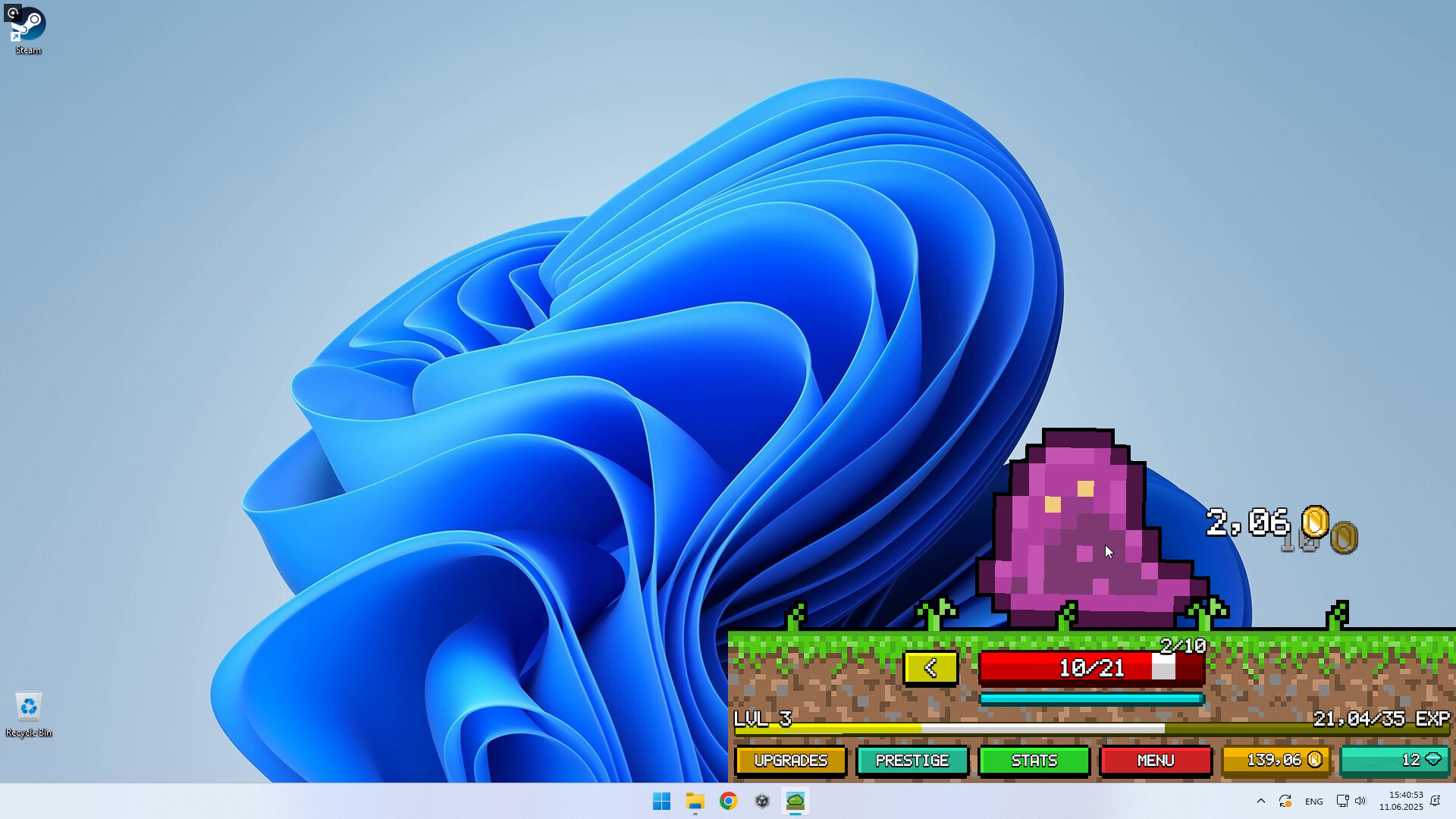
The core pitch made literal: a tiny combat window floating directly over the desktop wallpaper, playable without ever leaving whatever else is on screen.Steam store page -
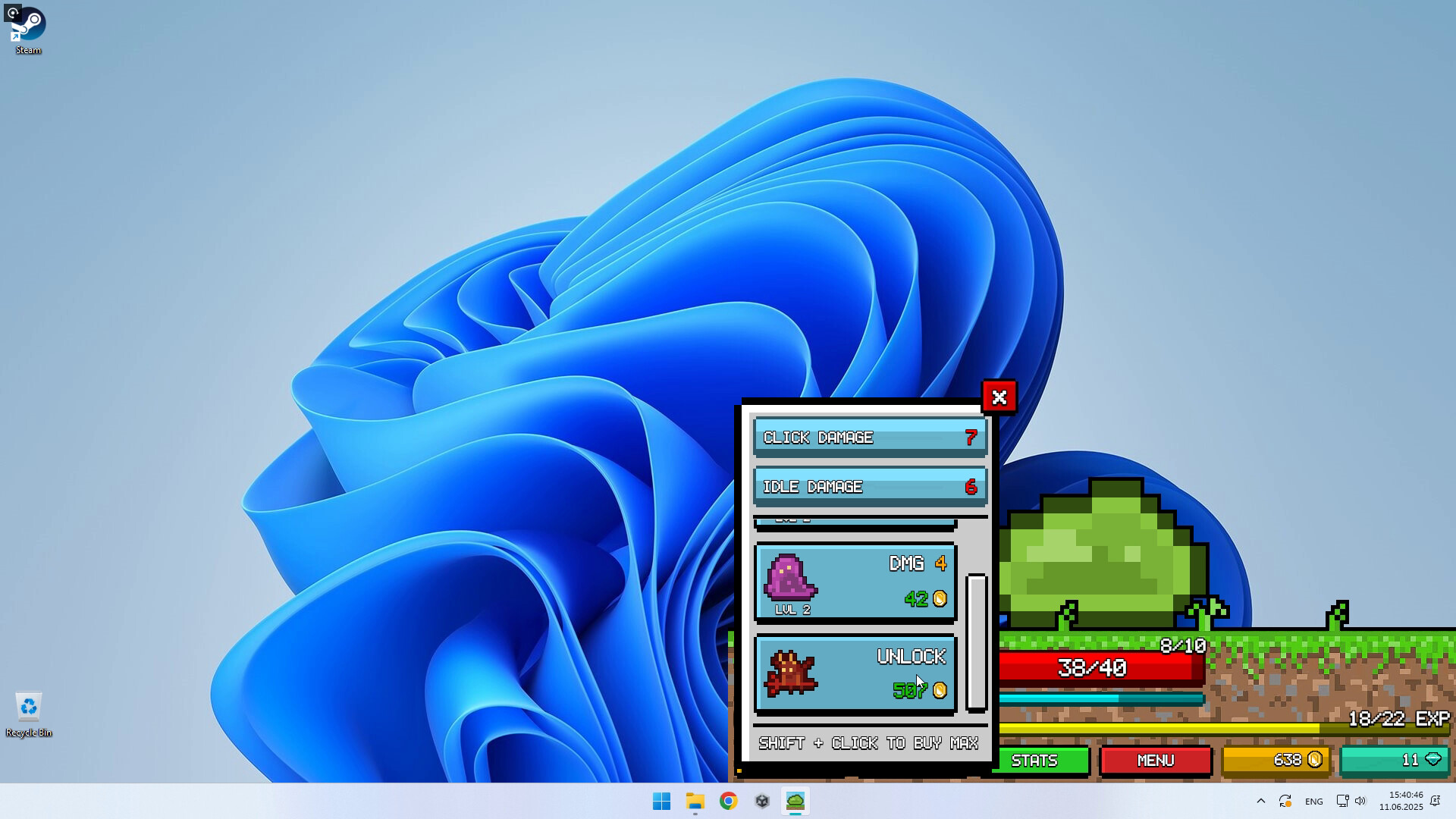
The Upgrades panel, confirming separate click- and idle-damage stats alongside per-monster upgrades and unlocks, with a shift-click buy-max shortcut built in.Steam store page -
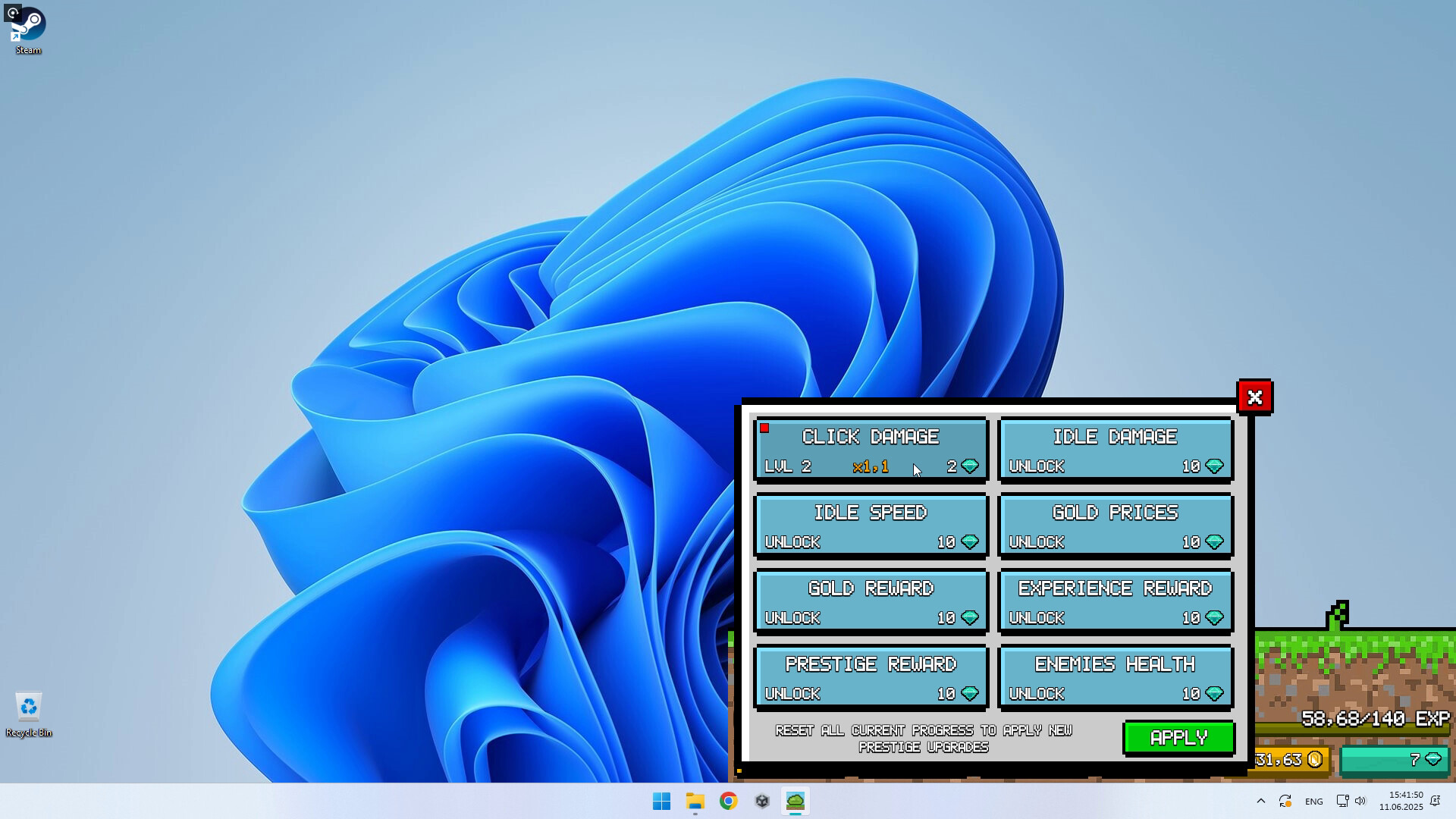
The Prestige panel, spanning eight distinct permanent-upgrade categories rather than a single flat multiplier — though applying any of them requires resetting all current progress first.Steam store page